n8n — for Easy Extract, Transform and Load
Overview
In our demonstration we are going to design a simple Extract, Transform, and Load process using n8n.
In our scenario we will be working with an imaginary retailer and their supplier, who also performs drop shipping.
Our retailer has a Microsoft SQL Server database that serves as the company's database for business operations, including an online e-commerce site.
The retailer takes orders through the site, and the supplier drop-ships them to the customer.
In order for the operations to work, the retailer must know the exact products in the supplier's inventory.
The supplier in our scenario does not have a sophisticated integration, so it was agreed with the retailer that they would use FTP to drop a CSV file in a specific directory on one of the retailer's servers.
As is often the case, the supplier's data format cannot be directly imported into the retailer's database, hence the need for the ETL operation.
The takeaway from this demonstration is the ease with which n8n can be leveraged to create ETL systems that are very flexible and easy to maintain.
Scenario
Our inputs for this process will include a SQL Server database and CSV files.
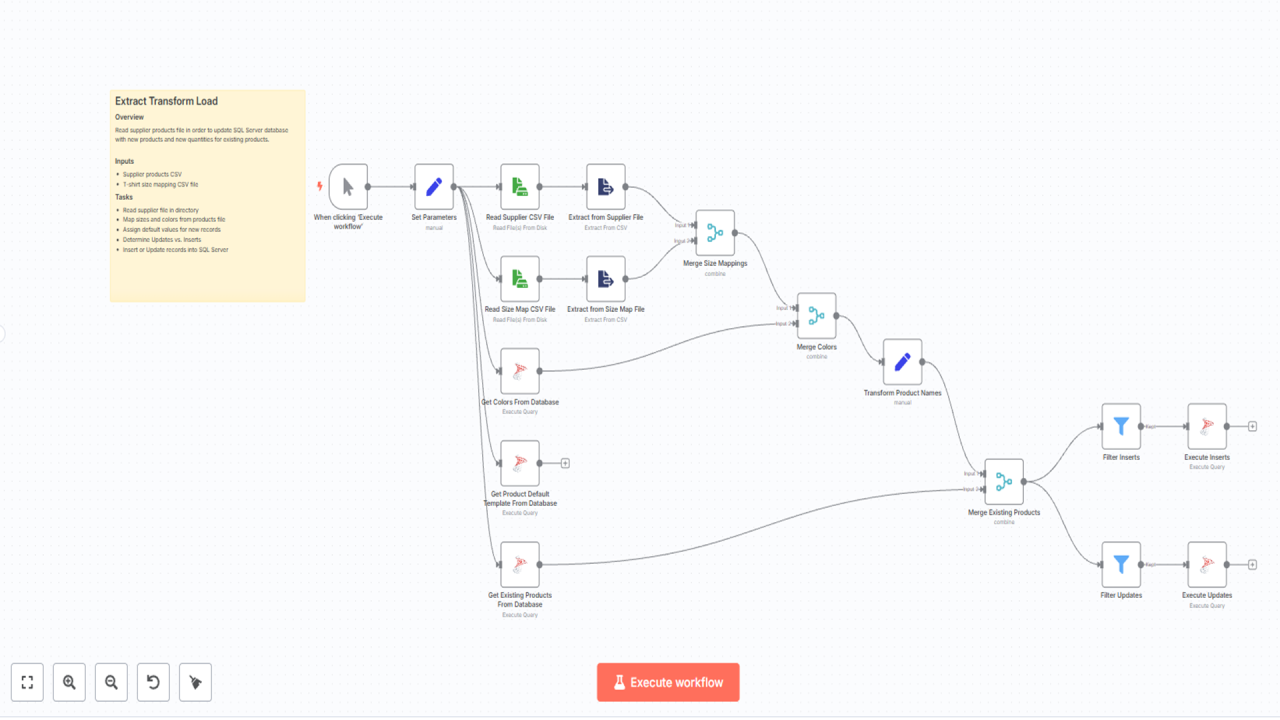
We will be adding n8n components iteratively to detail how to accomplish our end result.
Our example will begin simple. The first CSV file contains a list of t-shirts and includes information such as name, color, quantity, and size.
The second CSV file contains key-value pairs to map the size names in the supplier's product CSV file with the size values that match the size field values used in the SQL database.
Unfortunately, the data in the CSV does not directly align with our table structure, so we will need to make some modifications.
In our example, we need to match the color to our color choices in the database, as well as the size, and the supplier — which is not included in the CSV file, as it is implicit from the FTP directory.
To keep the demonstration brief, simple, and focused, we will not be optimizing the operation or including features you'd find in a production environment, like error handling, notifications, retries, and other aspects. Instead, we will focus on the basic steps needed to highlight designing an ETL process in n8n.
This article also includes a full video walkthrough: